Tutorial 3 — Restarting a run & understanding the outputs
Goal: learn how to (a) continue a simulation from a checkpoint — essential for long production runs that exceed a wall-clock limit or get interrupted — and (b) understand every file TOPO writes.
Time: two short runs, ~2 seconds each.
Prerequisite: do Tutorial 1 first. This
tutorial reuses the same single-domain protein (P0CX28).
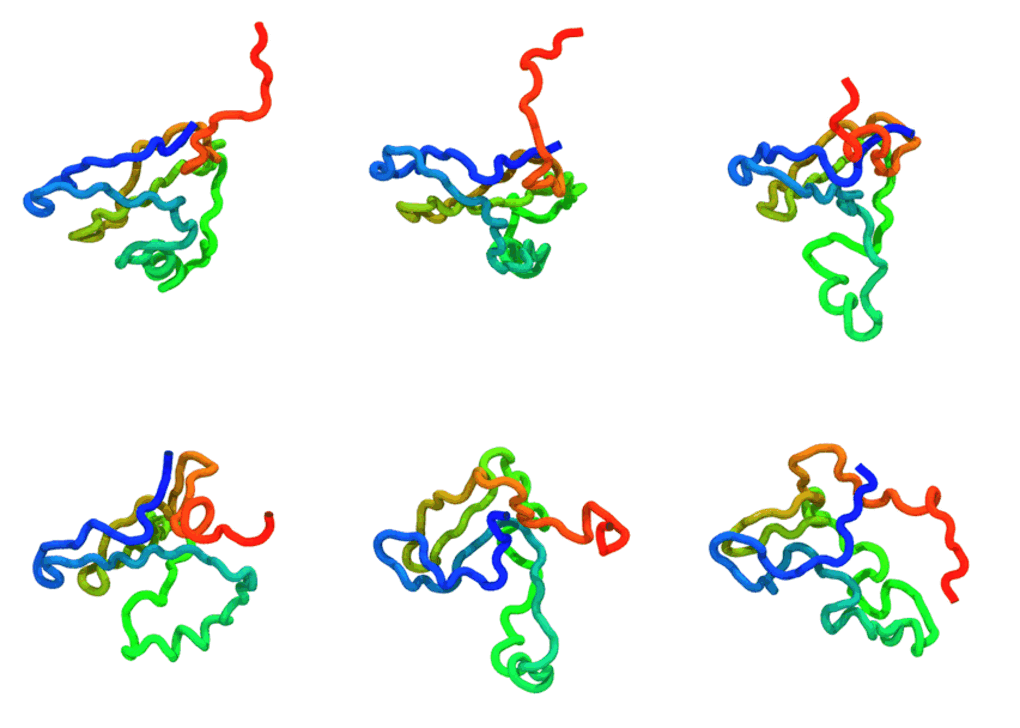
The run — stage 1 (0→5 000 steps) continued from the checkpoint to 10 000 steps: one seamless trajectory.
Regenerate after both runs with
python ../_viz/render_cg.py --psf traj/traj.psf --dcd traj/traj.dcd --out img --hero 0.
Files in this folder
File |
Role |
|---|---|
|
Input structure. |
|
Stage 1: the initial run ( |
|
Stage 2: continue from the checkpoint ( |
|
The runner script. |
How restarting works
TOPO writes a checkpoint file (traj/traj.chk) every nstchk steps
(nstchk defaults to nstxout if unset). A checkpoint stores the full dynamical
state — positions and velocities — so a restarted run picks up exactly where
it left off (not just the coordinates).
Two settings control a restart:
restart = yes— load the checkpoint instead of the PDB’s coordinates, and skip minimization.md_steps— the TOTAL target step count, not the number of extra steps. The runner computesremaining = md_steps - steps_already_doneand runs only that many. So to add 5000 steps on top of an initial 5000, setmd_steps = 10000.
Everything else (output_dir, outname, pdb_file) must stay identical
between stages so the restart targets the same files. On restart, the reporters
append to the existing .log and .dcd, giving you one continuous record.
Step-by-step
1. Stage 1 — initial run
python run_simulation.py -f md.ini
This produces traj/traj.chk, traj/traj.log, traj/traj.dcd, etc., and runs
to step 5000. Check the last log line:
tail -1 traj/traj.log # step column should read 5000
2. Stage 2 — continue from the checkpoint
python run_simulation.py -f md_restart.ini
Watch the console: it prints
Restart simulation from step: 5000 and then runs 5000 more steps to reach
10000. Confirm the log now continues past 5000:
tail -3 traj/traj.log # you should now see step 10000 at the end
The .dcd trajectory has likewise grown — it was appended to, not overwritten.
If you re-run stage 2 again, it will see
steps_done = 10000, computeremaining = 0, and do nothing — exactly what you want for an idempotent “make sure it reached 10000 steps” workflow.
The output files, in full
File |
Format |
Purpose |
When to use |
|---|---|---|---|
|
text (fixed-width) |
Step, time, energies, temperature, speed. |
Quick health check, plotting energy vs time. |
|
binary |
Trajectory: coordinates every |
Visualization (VMD), analysis (MDAnalysis, MDTraj). |
|
binary |
Checkpoint: positions + velocities, every |
Restarting (this tutorial). |
|
text |
CA-model topology (atoms, bonds). |
Loading the |
|
text |
Last conformation (CA PDB). |
Seed a follow-up run via |
|
text |
Run provenance: package versions, hardware, GPU, timing. |
Reproducibility; debugging performance differences. |
|
text |
Cached STRIDE hydrogen-bond output (next to the input PDB). |
Reused automatically; delete to force regeneration. |
Loading the trajectory for analysis
import MDAnalysis as mda
u = mda.Universe("traj/traj.psf", "traj/traj.dcd")
print(u.atoms.n_atoms, "CA beads,", len(u.trajectory), "frames")
# e.g. compute RMSD to the initial frame, radius of gyration, etc.
Key takeaways
Checkpoint = positions + velocities → seamless continuation.
md_stepsis a total, not an increment.Logs and trajectories append on restart, so long runs stay in one file set.
Keep
output_dir/outname/pdb_fileconsistent across stages.
Try next
Split a longer run into 3+ stages (
md_steps = 15000,20000, …) to mimic a cluster job that resubmits itself until it reaches the target length.Apply the same restart pattern to the multidomain run from Tutorial 2.